rics.performance#
Performance testing utility.
Functions
|
Run performance tests for multiple candidate methods on collections of test data. |
|
Format performance counter output. |
Format performance counter output. |
|
|
Plot the results of a performance test. |
|
Create a DataFrame from performance run output. |
Classes
|
Performance testing implementation for multiple candidates and data sets. |
- class MultiCaseTimer(candidate_method: Union[Callable[[Any], None], Collection[Callable[[Any], None]], Dict[str, Callable[[Any], None]]], test_data: Union[Any, Dict[str, Any]])[source]#
Bases:
objectPerformance testing implementation for multiple candidates and data sets.
- Parameters
candidate_method – A single method, collection of method or a dict {label: function} of candidates.
test_data – A single datum or a dict
{label: data}to evaluate candidates on.
- run(time_per_candidate: float = 6.0, repeat: int = 5, number: Optional[int] = None) Dict[str, Dict[str, List[float]]][source]#
Run for all cases.
Note that the test case variant data isn’t included in the expected runtime computation, so increasing the amount of test data variants (at initialization) will reduce the amount of times each candidate is evaluated.
- Parameters
time_per_candidate – Desired runtime for each repetition per candidate label. Ignored if number is set.
repeat – Number of times to repeat for all candidates per data label.
number – Number of times to execute each test case, per repetition. Compute based on per_case_time_allocation if
None.
Examples
If repeat=5 and time_per_candidate=3 for an instance with and 2 candidates, the total runtime will be approximately
5 * 3 * 2 = 30seconds.- Returns
A dict run_results on the form
{candidate_label: {data_label: [runtime..]}}.- Raises
ValueError – If the total expected runtime exceeds max_expected_runtime.
Notes
Precomputed runtime is inaccurate for functions where a single call are longer than time_per_candidate.
See also
The
timeit.Timerclass which this implementation depends on.
- run_multivariate_test(candidate_method: Union[Callable[[Any], None], Collection[Callable[[Any], None]], Dict[str, Callable[[Any], None]]], test_data: Union[Any, Dict[str, Any]], time_per_candidate: float = 6.0, plot: bool = True, **figure_kwargs: Any) DataFrame[source]#
Run performance tests for multiple candidate methods on collections of test data.
This is a convenience method which combines
MultiCaseTimer.run(),to_dataframe()and – if plotting is enabled –plot_run(). For full functionally these methods should be use directly.- Parameters
candidate_method – Candidate methods to evaluate.
test_data – Test data to evaluate.
time_per_candidate – Desired runtime for each repetition per candidate label.
plot – If
True, plot a figure usingplot_run().**figure_kwargs – Keyword arguments for the barplot. Ignored if
plot=False.
- Returns
A long-format DataFrame of results.
- Raises
ModuleNotFoundError – If Seaborn isn’t installed and
plot=True.
- format_perf_counter(start: float, end: Optional[float] = None) str[source]#
Format performance counter output.
This function formats performance counter output based on the time elapsed. For
t < 120 sec, accuracy is increased whereas for durations above one minute a more user-friendly formatting is used.- Parameters
start – Start time.
end – End time. Set to now if not given.
- Returns
A formatted performance counter time.
Examples
>>> from rics.performance import format_perf_counter
>>> format_perf_counter(0, 3131)  # 3131 seconds is about 52 minutes.
'0:52:11'
>>> format_perf_counter(0, 0.154)
'0.154 sec'
See also
- format_seconds(t: float) str[source]#
Format performance counter output.
This function formats performance counter output based on the time elapsed. For
t < 120 sec, accuracy is increased whereas for durations above one minute a more user-friendly formatting is used.- Parameters
t – Time in seconds.
- Returns
A formatted performance counter time.
- plot_run(run_results: Union[Dict[str, Dict[str, List[float]]], DataFrame], x: Optional[Literal['candidate', 'data']] = None, unit: Literal['s', 'ms', 'μs', 'us'] = 'ms', **figure_kwargs: Any) None[source]#
Plot the results of a performance test.
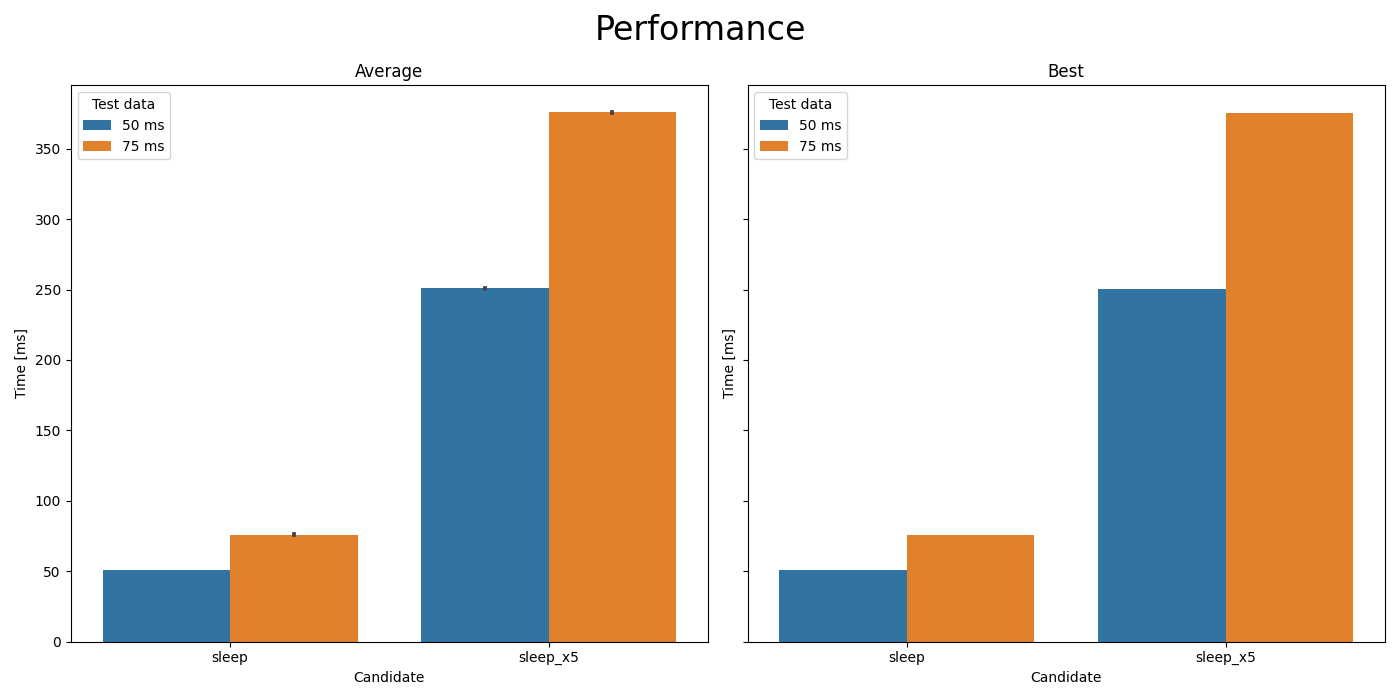
Comparison of
time.sleep(t)andtime.sleep(5*t).#- Parameters
run_results – Output of
rics.performance.MultiCaseTimer.run().x – The value to plot on the X-axis. Default=derive.
unit – Time unit to plot on the Y-axis.
**figure_kwargs – Keyword arguments for the barplot.
- Raises
ModuleNotFoundError – If Seaborn isn’t installed.
ValueError – For unknown unit arguments.
- to_dataframe(run_results: Dict[str, Dict[str, List[float]]]) DataFrame[source]#
Create a DataFrame from performance run output.
- Parameters
run_results – Output from
rics.performance.MultiCaseTimer.run().- Returns
The run_result input wrapped in a DataFrame.
Modules
Entry point for the performance testing CLI program. |