rics.pandas#
Utility functions for pandas.
Classes
|
Create temporal k-folds from a |
|
- class TimeFold(time: Timestamp, data: DataFrame, future_data: DataFrame)[source]#
Bases:
NamedTupleCreate temporal k-folds from a
DataFramefor cross-validation.Folds are closed on the right side (inclusive left).
Use
TimeFold.iter()to create folds, orTimeFold.make_sklearn_splitter()to create a scikit-learn compatible splitter for cross validation.The ranges surrounding the
scheduled timesare determined by the before and after arguments, interpreted as follows based on type:Before/after argument options.# Argument type
Interpretation
String
'all`Include all data before/after the scheduled time.
int > 0Include all data within N schedule periods from the scheduled time.
Anything else
Passed as-is to the
pandas.Timedeltaclass. Must be positive.Folds always lie fully within the available time span, but empty
dataorfuture_dataframes are possible if the data is not continuous.Examples
Iterating over folds using
TimeFold.iter.>>> df = pd.DataFrame({'time': pd.date_range('2022', '2022-1-15', freq='7h')}) >>> for fold in TimeFold.iter(df, schedule='68h', after='1d'): ... print(fold) TimeFold('2022-01-06 16:00:00': data.shape=(17, 1), future_data.shape=(3, 1)) TimeFold('2022-01-09 12:00:00': data.shape=(18, 1), future_data.shape=(3, 1)) TimeFold('2022-01-12 08:00:00': data.shape=(17, 1), future_data.shape=(4, 1))
The
TimeFoldclass is a named tuple, so it can be unpacked.>>> for t, d, fd in TimeFold.iter(df, schedule='68h', after='1d'): ... print(f"{t}: {len(d)=}, {len(fd)=}") 2022-01-06 16:00:00: len(d)=17, len(fd)=3 2022-01-09 12:00:00: len(d)=18, len(fd)=3 2022-01-12 08:00:00: len(d)=17, len(fd)=4
Including all data before the scheduled time.
>>> for fold in TimeFold.iter(df, schedule='68h', before='all'):
...    print(fold)
TimeFold('2022-01-03 20:00:00': data.shape=(10, 1), future_data.shape=(10, 1))
TimeFold('2022-01-06 16:00:00': data.shape=(20, 1), future_data.shape=(10, 1))
TimeFold('2022-01-09 12:00:00': data.shape=(30, 1), future_data.shape=(9, 1))
Plotting folds using
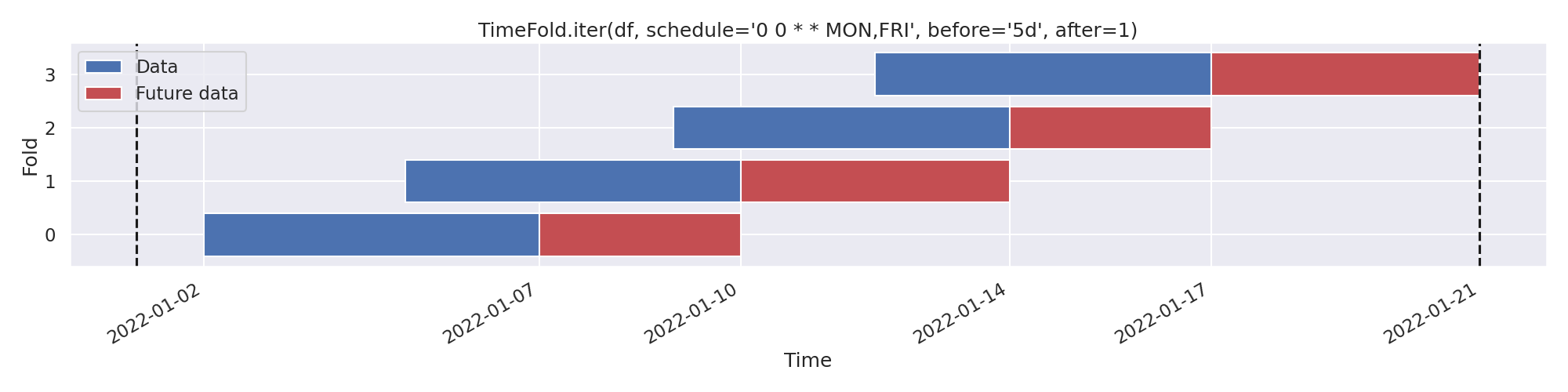
TimeFold.plot.>>> from rics import configure_stuff; configure_stuff() >>> df = pd.DataFrame({'time': pd.date_range('2022', '2022-1-21')}) >>> TimeFold.plot(df, schedule='0 0 * * MON,FRI')
The expression
'0 0 * * MON,FRI'means “every Monday and Friday at midnight”.With
after=1(the default), our Future data expands until the next scheduled time. This may be interpreted as “taking a step forward” in the schedule. Using integer before arguments works analogously, in the opposite direction. Vertical lines indicate outer limits of df.Notes
This method may be used to create temporal folds from heterogeneous/unaggregated data, typically used for training models (e.g. on raw transaction data). If your data is a well-formed time series, consider using the TimeSeriesSplit class from scikit-learn instead.
- future_data: DataFrame#
(“Future”) data, after the scheduled time. Determined by the after-argument.
- classmethod iter(df: DataFrame, schedule: Union[DatetimeIndex, Timedelta, timedelta, Sequence, str] = '1d', before: Union[int, str, Literal['all'], Timedelta, timedelta] = '5d', after: Union[int, str, Literal['all'], Timedelta, timedelta] = 1, time_column: Optional[str] = 'time') Iterable[TimeFold][source]#
Create temporal k-folds from a heterogeneous
DataFrame.- Parameters:
df – A pandas
DataFrame.schedule – Timestamps which denote the anchor dates of the folds (e.g. training dates). If a
Timedeltaorstr, create schedule from the start ofdf[time_column]. Alternatively, you may pass a cron expression (requirescroniter).before – The period before the scheduled time to include. See Before/after argument options.
after – The period after the scheduled time to include. See Before/after argument options.
time_column – Column to base the folds on. Use index if
None.
- Yields:
Tuples
TimeFold(time, data, future_data).
See also
The
TimeFold.plot()method, which may be used to visualize temporal folds.
- classmethod make_sklearn_splitter(schedule: Union[DatetimeIndex, Timedelta, timedelta, Sequence, str] = '1d', before: Union[int, str, Literal['all'], Timedelta, timedelta] = '5d', after: Union[int, str, Literal['all'], Timedelta, timedelta] = 1, time_column: Optional[str] = None) DatetimeSplitter[source]#
Create a scikit-learn compatible splitter.
- Parameters:
schedule – Timestamps which denote the anchor dates of the folds (e.g. training dates). If a
Timedeltaorstr, create schedule from the start ofdf[time_column]. Alternatively, you may pass a cron expression (requirescroniter).before – The period before the scheduled time to include. See Before/after argument options.
after – The period after the scheduled time to include. See Before/after argument options.
time_column – Column to base the folds on. Use index if
None. If given, the returned splitter will not be able to handle y-arguments.
- Returns:
A sklearn-compatible splitter backed by
TimeFold.iter().
See also
The
TimeFold.plot()method, which may be used to visualize temporal folds.
- classmethod plot(df: DataFrame, schedule: Union[DatetimeIndex, Timedelta, timedelta, Sequence, str] = '1d', before: Union[int, str, Literal['all'], Timedelta, timedelta] = '5d', after: Union[int, str, Literal['all'], Timedelta, timedelta] = 1, time_column: Optional[str] = 'time', ax: Optional[Axes] = None, **kwargs: Any) Axes[source]#
Plot the intervals that would be returned by
TimeFold.iter()if invoked with the same parameters.- Parameters:
df – A pandas
DataFrame.schedule – Timestamps which denote the anchor dates of the folds (e.g. training dates). If a
Timedeltaorstr, create schedule from the start ofdf[time_column]. Alternatively, you may pass a cron expression (requirescroniter).before – The period before the scheduled time to include for each iteration. See Before/after argument options.
after – The period after the scheduled time to include for each iteration. See Before/after argument options.
time_column – Column to base the folds on. Use index if
None.ax – Axis to use for plotting. Creates a new figure using
matplotlib.pyplot.subplots()ifNone.**kwargs – Keyword arguments for
matplotlib.pyplot.subplots(). Default arguments:{"tight_layout": True, "figsize": (<default-width>, 3 + 0.5 * num_folds)}
- Returns:
A
Figureobject.- Raises:
ValueError – For empty ranges.
- class DatetimeSplitter(schedule: Union[DatetimeIndex, Timedelta, timedelta, Sequence, str], before: Union[int, str, Literal['all'], Timedelta, timedelta], after: Union[int, str, Literal['all'], Timedelta, timedelta], time_column: Optional[str])[source]#
Bases:
objectSee
TimeFold.make_sklearn_splitter().- get_n_splits(X: Optional[DataFrame] = None, y: Optional[Union[DataFrame, Series]] = None, groups: Optional[Any] = None) int[source]#
Returns the number of splitting iterations with the given arguments.
- split(X: Optional[DataFrame] = None, y: Optional[Union[DataFrame, Series]] = None, groups: Optional[Any] = None) Iterable[Tuple[List[int], List[int]]][source]#
Generate indices to split data into training and test set.
- Parameters:
X – Training data (features). Must be a
Pandastype.y – Target variable. Must be a
Pandastype.groups – Always ignored, exists for compatibility.
- Yields:
The training/test set indices for that split.
- Raises:
ValueError – If both X and y are
None.