rics.ml.time_split#
Create temporal k-folds for cross-validation with heterogeneous data.
Examples#
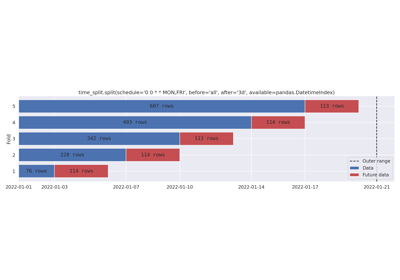
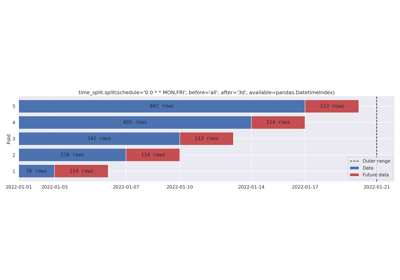
Cron schedule, keeping all data before the schedule.
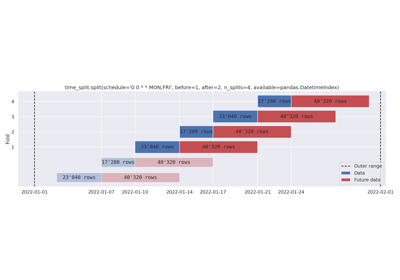
Removing folds with n_splits. Dynamic before and after-data.
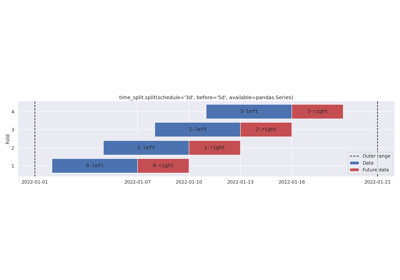
User guide#
High-level overview of relevant concepts.
Specification#
A single fold is a 3-tuple of bounds (start, mid, end), see DatetimeSplitBounds. A list thereof
are called ‘splits’, and have type DatetimeSplits.
- Conventions:
The ‘mid’ timestamp is assumed to be the (simulated) training date, and
Data is restricted to
start <= data.timestamp < mid, andFuture data is restricted to
mid <= future_data.timestamp < end.
- Guarantees:
Splits are strictly increasing: For all indices
i,splits[i].mid < splits[i+1].midholds.Timestamps within a fold are strictly increasing:
start[i] < mid[i] < end[i].If available data is given and
flex=False, no part of any fold will lie outside the available range.
By default, the bounds derived from available data is flexible. See Flex for
details.
- Restrictions:
Schedules#
There are two types of Schedule; bounded and unbounded. Any collection will be
interpreted as a bounded schedule. Unbounded schedules are either cron expressions, or a pandas
offset alias.
Bound schedules. These are always viable.
>>> import pandas
>>> schedule = ["2022-01-03", "2022-01-07", "2022-01-10", "2022-01-14"]
>>> another_schedule = pandas.date_range("2022-01-01", "2022-10-10")
Unbounded schedules. These must be made bounded by a data argument.
>>> cron_schedule = "0 0 * * MON,FRI"  # Monday and friday at midnight
>>> offset_alias_schedule = "5d"  # Every 5 days
Bounded schedules are sometimes referred to as explicit schedules.
Before and after arguments#
The before and after Span arguments determine how much data is included in the
Data (given by before) and Future data (given by after) ranges of each fold.
Argument type |
Interpretation |
|---|---|
String |
Include all data before/after the scheduled time. Equivalent to |
|
Include all data within N schedule periods from the scheduled time. |
Anything else |
Passed as-is to the |
Use of all of these are demonstrated in the examples section.
Available data flex#
Data Flex allows bounds inferred from and available data argument to stretch outward
slightly. This useful in situations where the data is open of the left side only, or when data is sparse enough that
there aren’t always records at exactly YYYY-mmm-dd 00:00:00. Consider the following scenario:
schedule_timestamp = "2022-01-08 00:00:00"
before, after = ("7d", "1d")
final_timestamp_in_dataset = "2022-01-08 23:59:55"
Without flex, the schedule_timestamp above is invalid since there isn’t enough after data to get one day of data
after the current schedule_timestamp. Using flex allows the splitter to stretch to 2022-08-09 00:00:00, yielding
the fold:
('2022-01-01' <= [schedule: '2022-01-08' (Saturday)] < '2022-01-09')
This function is enabled by default since the scenario above is common. Set flex=False to disable.
Functions
|
Log iteration progress over splits using logger. |
|
Visualize ranges in splits. |
|
Create time-based cross-validation splits. |
- split(schedule: DatetimeIndex | Iterable[str | Timestamp | datetime | date | datetime64] | str | Timedelta | timedelta | timedelta64, *, before: int | Literal['all'] | str | Timedelta | timedelta | timedelta64 = '7d', after: int | Literal['all'] | str | Timedelta | timedelta | timedelta64 = 1, n_splits: int | None = None, available: Iterable[str | Timestamp | datetime | date | datetime64] = None, flex: bool | Literal['auto'] | str = 'auto') List[DatetimeSplitBounds][source]#
Create time-based cross-validation splits.
- Parameters:
schedule – A collection of timestamps, a pandas offset alias, or a cron expression.
before – Range before schedule timestamps. Either a pandas offset alias, an integer (schedule-based offsets), or ‘all’ (requires available data).
after – Range after schedule timestamps. Either a pandas offset alias, an integer (schedule-based offsets), or ‘all’ (requires available data).
n_splits – Maximum number of folds, preferring folds later in the schedule.
available – Binds schedule to a range. Passing a tuple
(min, max)is enough.flex – A pandas offset alias used to expand available data to its likely “true” limits. Set to
Falseto disable. Seetypes.Flexfor details.
For more information about the schedule and before/after-arguments, see the User guide.
- Returns:
A list of tuples
[(start, mid, end), ...].
- plot(schedule: DatetimeIndex | Iterable[str | Timestamp | datetime | date | datetime64] | str | Timedelta | timedelta | timedelta64, *, before: int | Literal['all'] | str | Timedelta | timedelta | timedelta64 = '7d', after: int | Literal['all'] | str | Timedelta | timedelta | timedelta64 = 1, n_splits: int | None = None, available: Iterable[str | Timestamp | datetime | date | datetime64] = None, flex: bool | Literal['auto'] | str = 'auto', bar_labels: str | Literal['rows'] | List[Tuple[str, str]] | bool = True, show_removed: bool = False, row_count_bin: str | Series = None, ax: Axes = None) Axes[source]#
Visualize ranges in splits.
- Parameters:
schedule – A collection of timestamps, a pandas offset alias, or a cron expression.
before – Range before schedule timestamps. Either a pandas offset alias, an integer (schedule-based offsets), or ‘all’ (requires available data).
after – Range after schedule timestamps. Either a pandas offset alias, an integer (schedule-based offsets), or ‘all’ (requires available data).
n_splits – Maximum number of folds, preferring folds later in the schedule.
available – Binds schedule to a range. If bar_labels is given but is not a
list, this data will be used to compute fold sizes.flex – A pandas offset alias used to expand available data to its likely “true” limits. Set to
Falseto disable. Seetypes.Flexfor details. Figures show the “real” (non-flex) outer data range.bar_labels – Labels to draw on the bars. If you pass a string, it will be interpreted as a time unit (see Offset aliases for valid frequency strings). Bars will show the number of units contained. Pass ‘rows’ to simply count the numbers of elements in data (if given). To write custom bar labels, pass a list
[(data_label, future_data_label), ...], one tuple for each fold. This may be used to write metric values per data set after cross validation.show_removed – If
True, splits removed by n_splits are included in the figure.row_count_bin – A pandas offset alias. If given, show normalized row count per row_count_bin in the background. Pass
pandas.Seriesto use pre-computed row counts.ax – Axis to use for plotting. If
None, create new axes.
For more information about the schedule and before/after-arguments, see the User guide.
- Returns:
Matplitlib axes.
- Raises:
ValueError – For invalid plot/split argument combinations.
- log_split_progress(splits: Sequence[DatetimeSplitBounds], *, logger: Logger | LoggerAdapter | str = 'rics.ml.time_split', start_level: int = 20, end_level: int = 20, extra: Dict[str, Any] = None) Iterable[DatetimeSplitBounds][source]#
Log iteration progress over splits using logger.
- Parameters:
splits – Splits to iterate over.
logger – Logger or logger name to use.
start_level – Log level to use for the
fold-begin message.end_level – Log level to use for the
fold-end message.extra – User-defined extra-arguments to use when logging, merged with progress-related extras. Will be available to all messages as well as the
foldkey. This argument is mutable; changes made to extra will be reflected in logged records.
- Returns:
An iterable over splits.
Examples
Basic usage.
>>> from rics.ml.time_split import split, log_split_progress
>>> splits = split("36h", available=("2023-08-10", "2023-08-19"))
>>> tracked_splits = log_split_progress(splits, logger="progress", start_level=logging.DEBUG)
>>> list(tracked_splits)
[progress:DEBUG] Begin fold 1/2: ('2023-08-11' <= [schedule: '2023-08-16' (Wednesday)] < '2023-08-17 12:00:00').
[progress:INFO] Finished fold 1/2 [schedule: '2023-08-16' (Wednesday)] after 5m 18s.
[progress:DEBUG] Begin fold 2/2: ('2023-08-12 12:00:00' <= [schedule: '2023-08-17 12:00:00' (Thursday)] < '2023-08-19').
[progress:INFO] Finished fold 2/2 [schedule: '2023-08-17 12:00:00' (Thursday)] after 4m 3s.
Modules
Convenience functions and classes for common libraries. |
|
Global settings for the splitting logic. |
|
Supporting functions. |
|
Types related to splitting data. |